Table of Contents
To install a plugin in your WordPress admin panel and follow the following steps.
Plugin Installing Method #
- Log into your WordPress site and opens the Administration Panel.
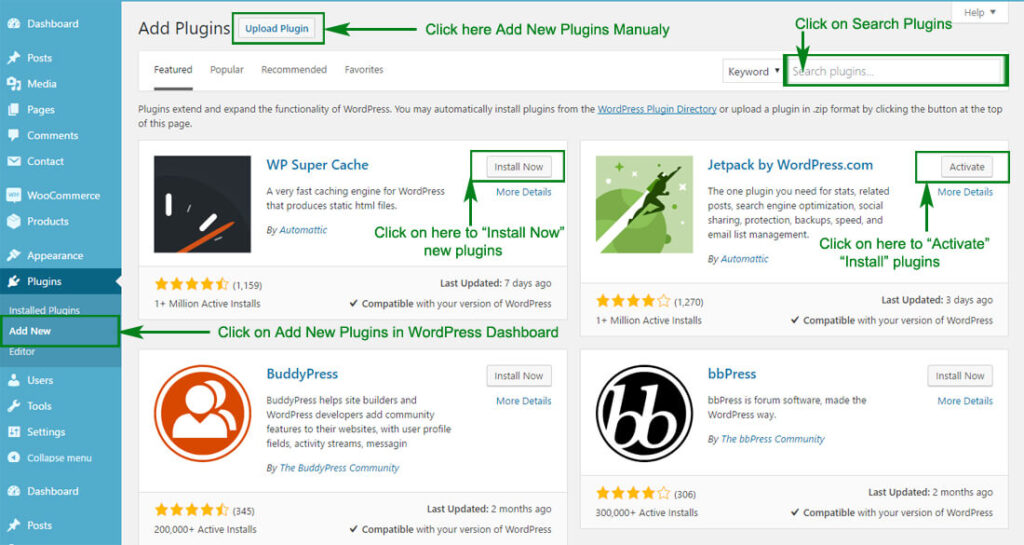
- Click Navigate to Plugins > Add New in the WordPress Dashboard.
- Search for the name of the plugin you wish to install which will return a list of potential plugins.
- Click Details to read more about a plugin.
- Click “Install Now” if you wish to install the plugin.
- It may ask if you are sure, and you may proceed. The installation will commence once you confirm to proceed.
- After the plugin is downloaded. Go to Plugins>Installed Plugins. Click “Activate Plugin” to make it available for use.
Recommended Plugins : We recommend you to download the following plugins when necessary: #
- Regenerate Thumnails by Alex Mills (Viper007Bond) (If you have existing content, this will help you update your image thumbnails sizes.)
- WooCommerce by woocommerce.com, by: Automattic (The most customizable eCommerce platform for building your online siness. Get started today for free.)
- Contact Form 7 by: Takayuki Miyoshi (Simple and easy plugin to create forms)