
Table of Contents
- HomePage Setting
- Configuring the front Page display setting
- Note : Remember that EditorialMag themes is fully base on Widget so first configer home page using widgets.
- Large With Grid Posts
- Configure: Large With Grid Posts
- Large Single With Small Posts
- Configure: Large Single With Small Posts
- EMag Slider Posts
- Configure: EMag Slider Posts
- Large With Small Posts
- Configure: Large With Small Posts
- Grid Layout Posts
- Configure: Grid Layout Posts
EditorialMag Provides a “Home Page” template for your home page. Please follow these steps to configure your home page with “home page” template.
HomePage Setting #
- Log into your WordPress site and open the Administration Panel.
- Go to Dashboard > Pages > Add New
- Enter the Page Title for the Page. You do not require to enter anything in the content section for creating a home page.
- Select the Home Page Template from the Page Attributes section.
- Click Publish

Configuring the front Page display setting #
- Log into your WordPress site and opens the Administration Panel.
- Go to Appearance > Customize > Static Front Page.
- Select A static page under Front Page displays.
- Click Save & Publish.

Note : Remember that EditorialMag themes is fully base on Widget so first configer home page using widgets. #
Large With Grid Posts #

Configure: Large With Grid Posts #
- Log into your WordPress site and opens the Administration Panel.
- Go to Dashboard > Appearance > Widgets
- Drag and drop the widget “Emag Large With Grid Posts” to “Home 1-Full Width Section”
- Click Save > Publish.

Large Single With Small Posts #
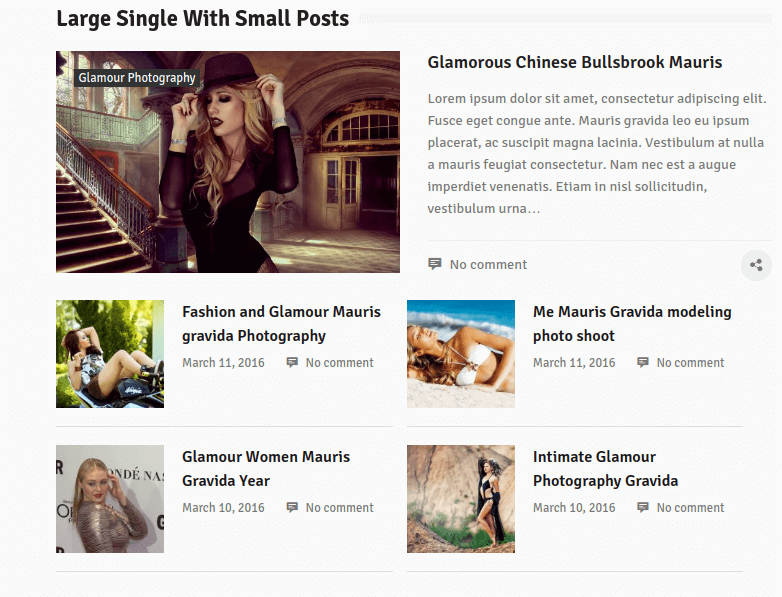
Configure: Large Single With Small Posts #
- Log into your WordPress site and opens the Administration Panel.
- Go to Dashboard > Appearance > Widgets
- Drag and drop the widget “Emag Large Single & Small Posts” to “Home 2- 3/1 Main Block Section”
- Click Save > Publish.
EMag Slider Posts #

Configure: EMag Slider Posts #
- Log into your WordPress site and opens the Administration Panel.
- Go to Dashboard > Appearance > Widgets
- Drag and drop the widget “EMag Slider Posts” to “Home 2- 3/1 Main Block Section”
- Click Save > Publish.
Large With Small Posts #

Configure: Large With Small Posts #
- Log into your WordPress site and opens the Administration Panel.
- Go to Dashboard > Appearance > Widgets
- Drag and drop the widget “EMag Large With Small Posts” to “Home 2- 3/1 Main Block Section”
- Click Save > Publish.
Grid Layout Posts #

Configure: Grid Layout Posts #
- Log into your WordPress site and opens the Administration Panel.
- Go to Dashboard > Appearance > Widgets
- Drag and drop the widget “EMag Grid Posts” to “Home 3- Full Width Section”
- Click Save > Publish.


