Table of Contents
In this theme, we have included Advance Options of WooCommerce Archive/Category Product Single Page.
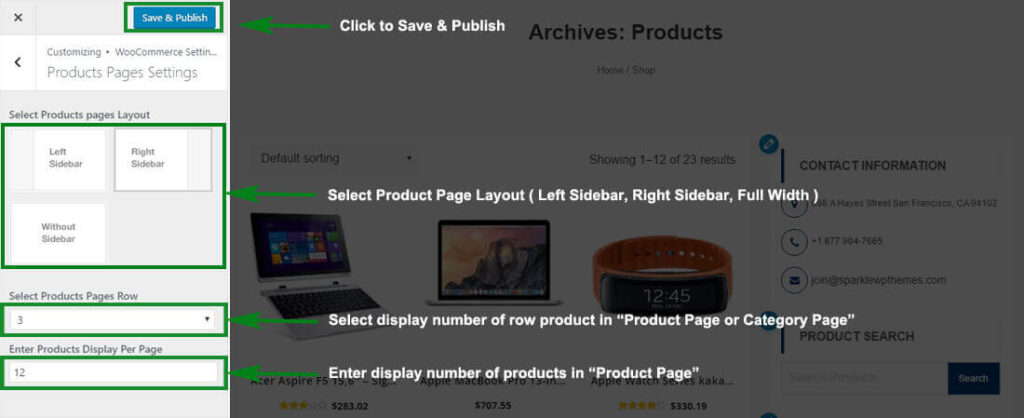
Products Pages Settings #
- Log into your WordPress site and opens the Administration Panel.
- Go to Dashboard > Appearance > Customize > WooCommerce Settings
- Open > WooCommerce Settings > Products Pages Settings
- Products Pages Settings > Manage Product/Category Page all the options per as you want.
- Click Save & Publish.
Single Products Page Settings #
- Log into your WordPress site and opens the Administration Panel.
- Go to Dashboard > Appearance > Customize > WooCommerce Settings
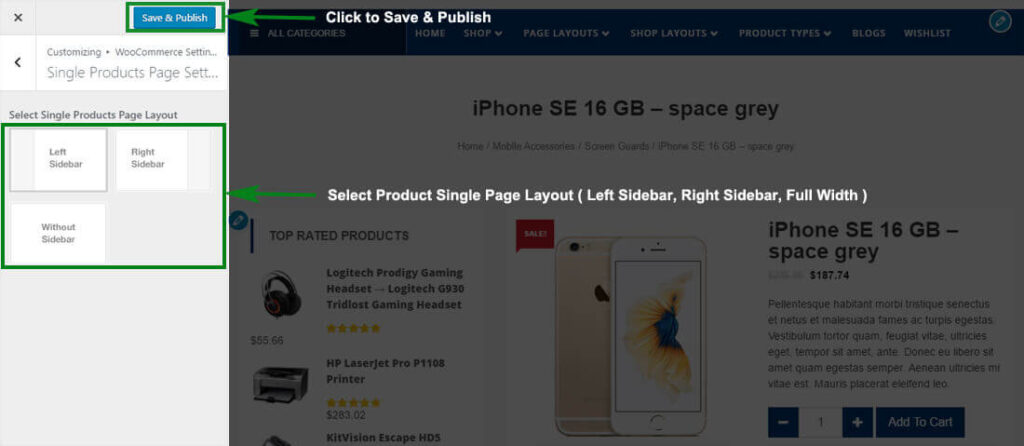
- Open > WooCommerce Settings > Single Products Page Settings
- Single Products Page Settings > Manage Product Single Page all the options per as you want.
- Click Save & Publish.
Breadcrumb Settings #

Configer Breadcrumb Settings #
- Log into your WordPress site and opens the Administration Panel.
- Go to Dashboard > Appearance > Customize
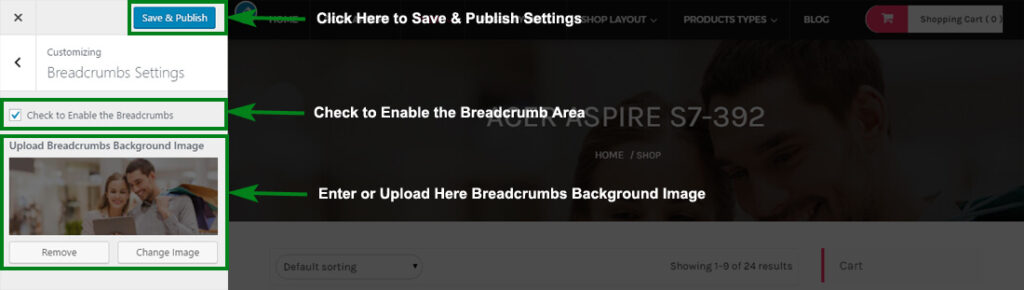
- Open > Breadcrumbs Settings
- Breadcrumbs Settings > Manage all the options per as you want.
- Click Save > Publish.